
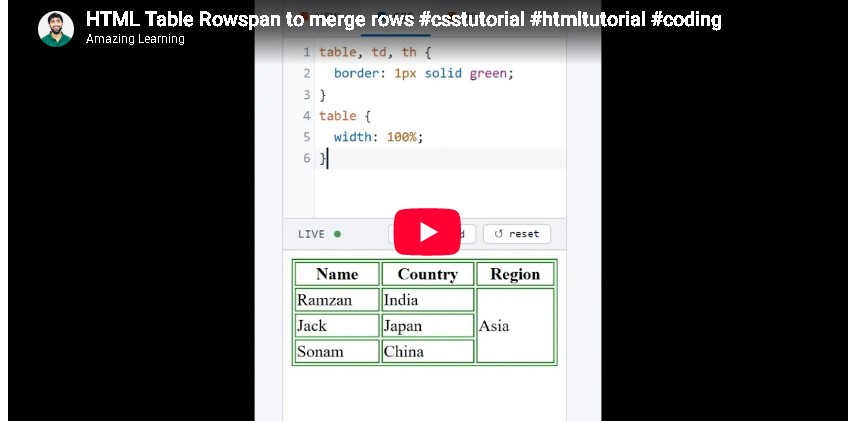
Get the code of HTML Table Rowspan to merge rows and watch video tutorials. You can practice using our code editor. Our practical guide will make your learning journey much easier. You can explore the tutorial and learn.
<table>
  <tr>
    <th>Name</th>
    <th>Country</th>
    <th>Region</th>
  </tr>
  <tr>
    <td>Ramzan</td>
    <td>India</td>
    <td rowspan="3">Asia</td>
  </tr>
  <tr>
    <td>Jack</td>
    <td>Japan</td>

  </tr>
  <tr>
    <td>Sonam</td>
    <td>China</td>

  </tr>
</table>
table, td, th {
border: 1px solid green;
}
table {
width: 100%;
}HTML Table Rowspan to Merge Rows
HTML tables are an essential part of web development because they help display information in a clear and organized format. You can use tables to present student results, employee schedules, product comparisons, price lists, and many other types of data. Sometimes, a table contains information that belongs to multiple rows, and repeating the same value in every row can make the layout look cluttered. The HTML rowspan attribute solves this problem by allowing a single cell to extend across two or more rows.
In this article, you will learn what HTML table rowspan means, how it works, where it is useful, and how it differs from other table attributes.
What Is Rowspan in HTML?
The rowspan attribute is used with HTML table header cells and data cells to make one cell occupy the space of multiple rows vertically. Instead of displaying the same information several times, you can combine the related rows under one shared cell.
For example, imagine a school timetable where the same subject appears across two consecutive time slots. Rather than repeating the subject name in both rows, you can use rowspan to create one cell that covers both rows.
This approach makes tables easier to read and helps visitors understand how different pieces of information are related.
Why Is the Rowspan Attribute Useful?
The rowspan attribute is especially helpful when your table contains grouped information. It can improve the layout and reduce unnecessary repetition, particularly in tables with several categories or related entries.
Here are some common situations where rowspan can be useful:
- School timetables: Display one subject or activity across multiple time slots.
- Employee schedules: Group shifts that belong to the same employee or department.
- Product comparisons: Organize related product information under a shared category.
- Business reports: Show a department name alongside several employees or results.
- Event schedules: Group activities that take place during a shared session.
Using rowspan appropriately creates a cleaner structure and helps readers understand the relationship between rows.
How Does HTML Rowspan Work?
The rowspan attribute specifies how many rows a table cell should occupy. For example, a value of two means that the cell extends across two rows, while a value of three means it occupies three rows.
The attribute is placed inside a table cell, such as a regular data cell or a header cell. The browser then allocates the specified number of rows to that cell.
One important detail is that you should not create additional cells in the rows that are already covered by the rowspan. Doing so can disrupt the table’s intended structure because the spanning cell already occupies that position.
For example, if the first cell in a column covers three rows, the following two rows should not contain another cell in that same column. The other columns can still contain their own cells as usual.
Understanding this behavior is essential when building tables with multiple rows and columns.
Difference Between Rowspan and Colspan
HTML provides two useful attributes for combining table cells: rowspan and colspan. Although they serve similar purposes, they work in different directions.
Rowspan combines space vertically, allowing one cell to extend across multiple rows.
Colspan combines space horizontally, allowing one cell to extend across multiple columns.
For example, if you want a department name to cover several employee rows, rowspan may be appropriate. If you want a heading to stretch across several columns, colspan is usually the better choice.
You can also use both attributes in the same table when necessary. However, combining them requires careful planning because the cells must fit together correctly without overlapping or creating unintended gaps.
Best Practices for Using Rowspan
Although rowspan is straightforward, a few good practices can help you create more readable and accessible tables.
Plan your table structure first. Before combining cells, decide which information belongs together and how many rows each shared cell should cover.
Avoid unnecessary merging. Not every repeated value needs to be combined. If merging cells makes the table harder to follow, repeating a value may be the clearer option.
Keep the table accessible. Use appropriate header cells and meaningful column headings so visitors can understand the information. For complex tables, consider how screen readers will communicate relationships between headers and data cells.
Check the layout on mobile devices. Tables with many columns or merged cells can be difficult to view on small screens. Use suitable responsive design techniques and test the table on different devices.
Review the row structure carefully. Each row should contain the correct number of cells after accounting for cells that span multiple rows. This helps prevent confusing layouts and misplaced information.
Common Mistakes to Avoid
One common mistake is placing extra cells in positions already occupied by a spanning cell. Another is specifying a rowspan value that does not match the intended table structure.
Beginners may also confuse rowspan with colspan and use the wrong attribute. Remember that rowspan extends vertically, while colspan extends horizontally.
It is also important to remember that rowspan changes the table’s structure, not its visual styling. You can use CSS to control borders, colors, spacing, and typography, but CSS does not replace the purpose of the rowspan attribute.
Conclusion
HTML table rowspan is a useful feature for organizing related information across multiple rows. It helps reduce repetition, group data logically, and create cleaner tables for timetables, reports, schedules, and other web content.
By understanding how rowspan works and how it differs from colspan, you can build more organized and meaningful HTML tables. Focus on a clear structure, accessible headings, and a layout that remains easy to read on different devices. With practice, you will be able to use these attributes confidently in your web development projects.
Ready to become a better coder? Don’t miss this tutorial!: How to create Contact Form using HTML CSS using animation